Features

Six reasons agencies switch. Everything else, underneath.

Less admin for your office, a better experience for your families, and money in sooner. Each point links to the live demo, so you can see it working.

02

Your brand on every screen. Families never see ours.

Portals, sign-in page, website, enquiry form, even the video call: all in your name, logo and colours.

See three agencies on one platform →
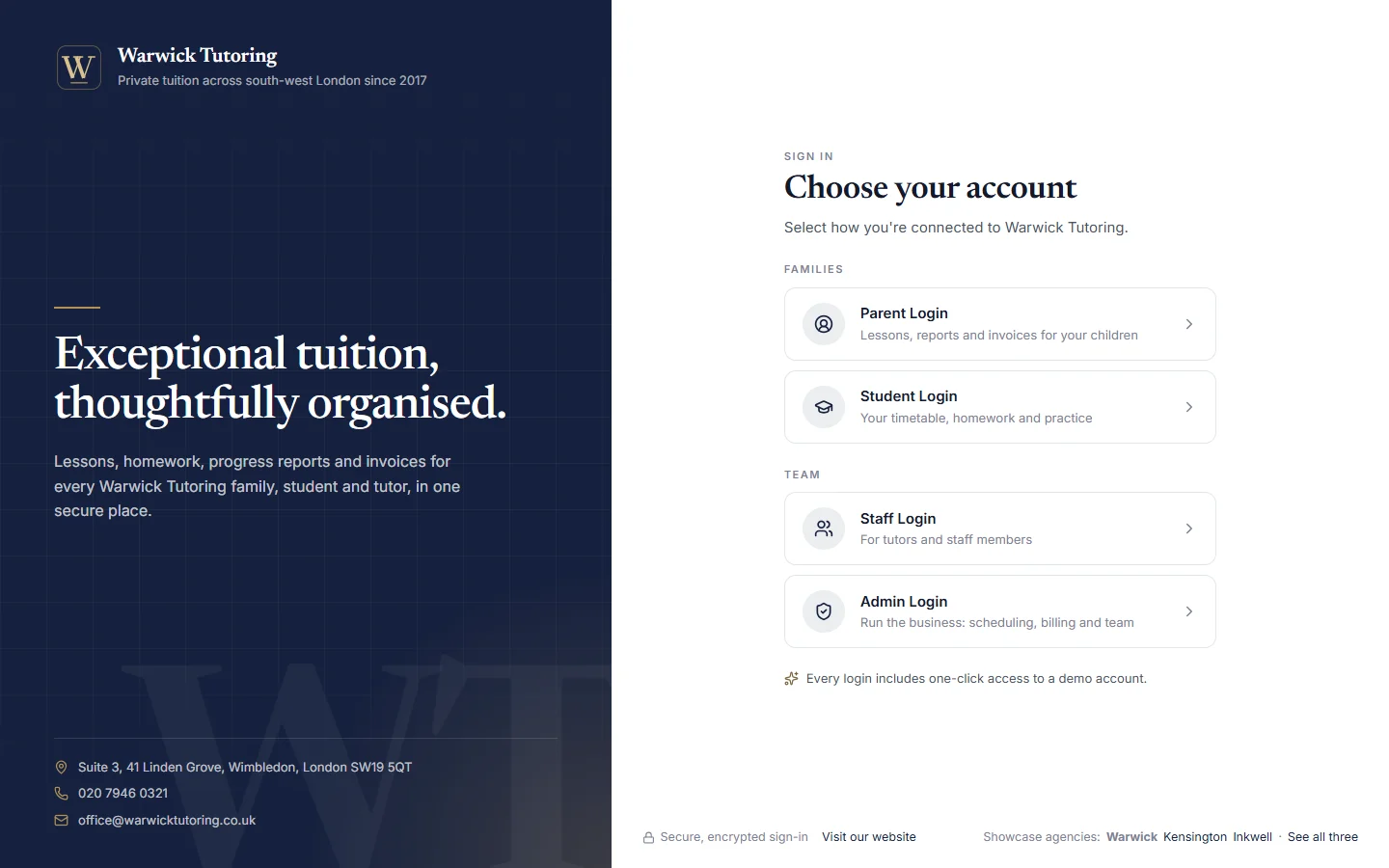
Warwick Tutoring's branded sign-in page: navy panel with a serif headline, and logins for parents, students, staff and admin
04

Reports parents value. Drafted in seconds, approved by you.

The month at a glance, focus areas, next steps and grades. AI drafts each report from the lesson notes, the tutor edits it, and your office approves it before the family sees it.

Read a report in the demo ↗ (opens in a new tab)
A shared monthly report in the parent portal: the month's lessons, attendance and homework, the tutor's comment, focus areas, next steps, and working-at and target grades
05

Safeguarding you can show. Data you can account for.

Tutor DBS records with expiry dates, messaging kept on the record, two-step sign-in for administrators, and tools to help you meet UK GDPR.

How we keep families' trust →
06

Set up for you. No blank screen.

We configure your branding, subjects, rates and policies with you. Bring your students, families and tutors across from a spreadsheet, or on Premier we move it all for you.

Book a personal demo →
Also built in

Teach online and use your own material. Without extra subscriptions.

A student with headphones in an online lesson on her laptop
Video lessons and recordings, inside your platformEvery online lesson gets its own private video room in your branding, opened from the timetable. Only the tutor, the student, their parents and your office can join. Tutors can record a lesson: they start and stop it, everyone in the call can see when it's recording, and you choose how long recordings are kept and whether families can watch them back. Prefer Zoom, Teams or Meet? Add your own link instead.
Interactive textbook chapter with key ideas, a tip and a step-by-step worked example
Your worksheets, made interactiveUpload the PDFs you already use, from worksheets to revision guides. They become online lessons that mark themselves, with every student's progress saved, and tutors can set chapters as homework.
The full list

Everything else in the platform.

For the office

Run the business day to day.

  • Timetable with clash detectionRecurring lessons, no double bookings.
  • Sessions and attendanceYour late-cancellation policy, applied the same way every time.
  • Weekly or monthly billingInvoices drafted automatically if you like, with overdue reminders.
  • Your rate cardFamily prices and tutor pay for each level, in person and online.
  • Price changes with noticeA new price from a date you choose, with an email and a portal notice first.
  • Prepaid lesson packagesInvoices use the package first, and families see the hours left.
  • Tutor payrollFrom logged lessons and agreed rates, with a statement for each tutor.
  • Tutor onboardingCV, contract, DBS and proof of address reviewed, with expiry dates tracked.
  • Spreadsheet importStudents, parents and tutors from a CSV, every row checked first.
  • Dashboards and activity logRevenue, hours taught and what needs attention.
  • Email and SMS notificationsSent automatically, with a log of what went to whom.

For tutors

Less admin after every lesson.

  • Their own timetableWith the video room or meeting link for each online lesson.
  • HomeworkSet it, students hand it in online, tutors mark it.
  • Assessments and progressResults tracked over time.
  • Rate agreementsAccepted in the app, so there's a record.
  • Earnings and payoutsThis month's pay, lesson by lesson.

For families

Everything in one calm place.

  • Parent portalEach child's timetable, notes, homework, reports and invoices.
  • Student portalWhat's due, practice, textbooks and progress.
  • "I've sent the payment"Parents tell the office when they've paid by bank transfer.
  • Students who pay for themselvesSixth-form and adult students with their own invoices.
  • Secure messagingFamilies, tutors and the office, kept off personal phones.
  • Calendar syncGoogle, Apple and Outlook.

Learning

Teaching material, ready to set.

  • Interactive textbooksWorked examples and questions that check themselves.
  • 11+ practice papersTimed, in all four areas, marked for you.
  • Official resources librarySpecifications, past papers and curriculum guidance.

Security and access

Private, and on the record.

  • Each agency kept separateAccess by role, checked on our servers.
  • Two-step sign-inAn authenticator app for administrators, which you can make compulsory.
  • Tools to help you meet UK GDPRExport a family's data in one file, or erase it while keeping the invoices you must retain.
  • Users and audit trailWho changed what, and when.
  • Every deviceDesktop, tablet and phone in the browser. Phone apps Coming soon
Four logins

Everyone gets their own door. And sees only what they should.

Tutors never see family invoices. Parents never see tutor rates. Students only see themselves.

Get started

See it for yourself. Explore our showcase agencies with a demo account for any of the four roles, or book a personal demo and we'll show you how yours would look.